
Every customer conversation, in one inbox.
Engage brings WhatsApp, Instagram and Messenger into one team inbox, with CRM, campaigns and automations built in. Designed, built and run by Comark.
- Official WhatsApp Business Platform
- Built, hosted and operated by Comark
 Maya Khoury·Is the Antalya package free on 12 Oct? We're 4.now · WhatsApp via Engage
 Noa Levi·Loved the new collection, is size M in stock?3 min ago · Instagram via Engage
 Omar Nassar·Please send the updated quote.5 min ago · WhatsApp via Engage
Businesses that run on our work














Our productOfficial Meta Business Partner
Meet EngageLeads, customers and conversations. One workspace.
One shared team inbox for WhatsApp, Instagram and Messenger, with a CRM, campaigns and automations built in.
Multi-language support: Hebrew, Arabic and English, fully right-to-left.
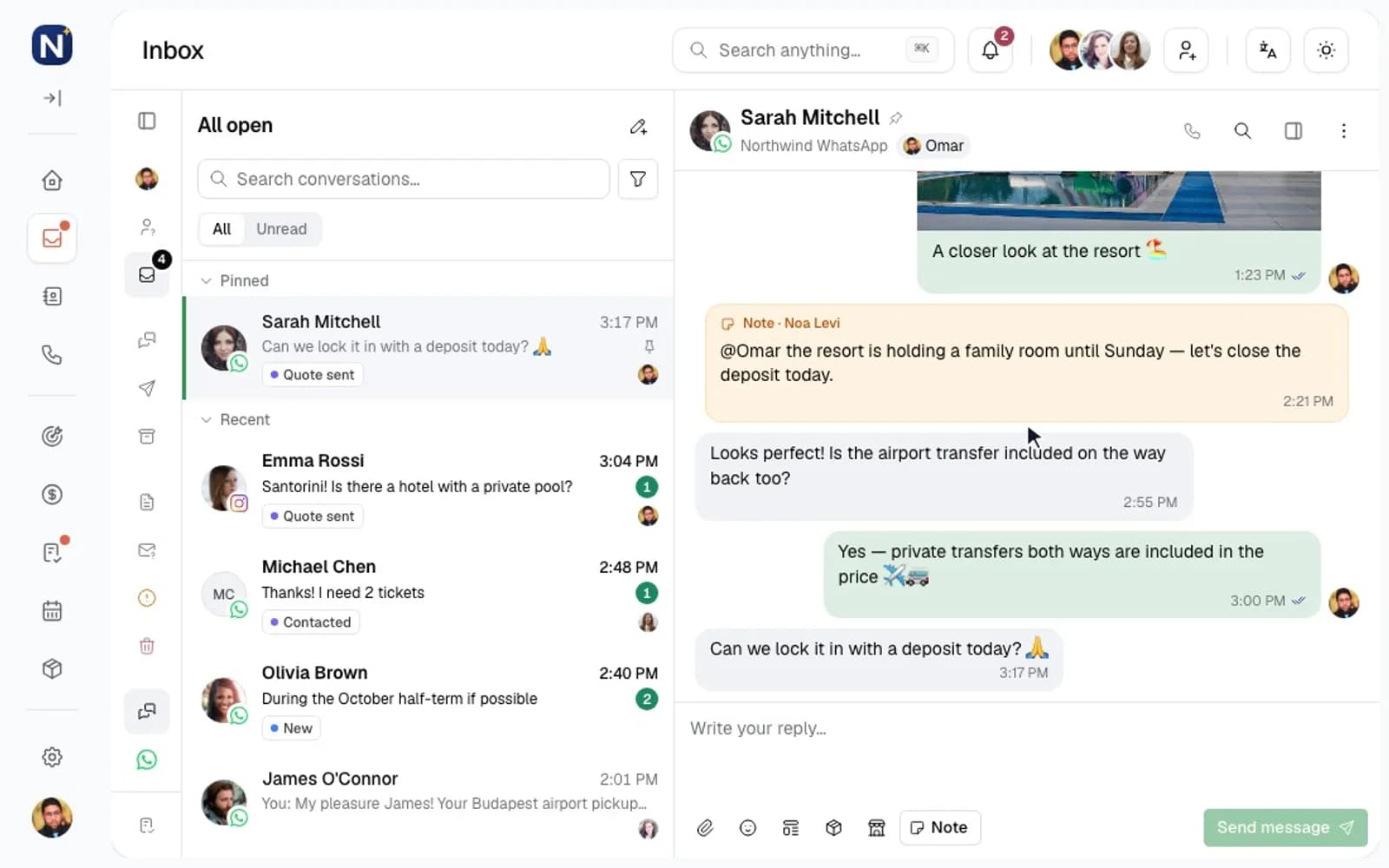
Every WhatsApp, Instagram and Messenger conversation in one shared team inbox: assigned, tagged and never lost.
01 · Unified & team inbox
Every conversation in one shared inbox.
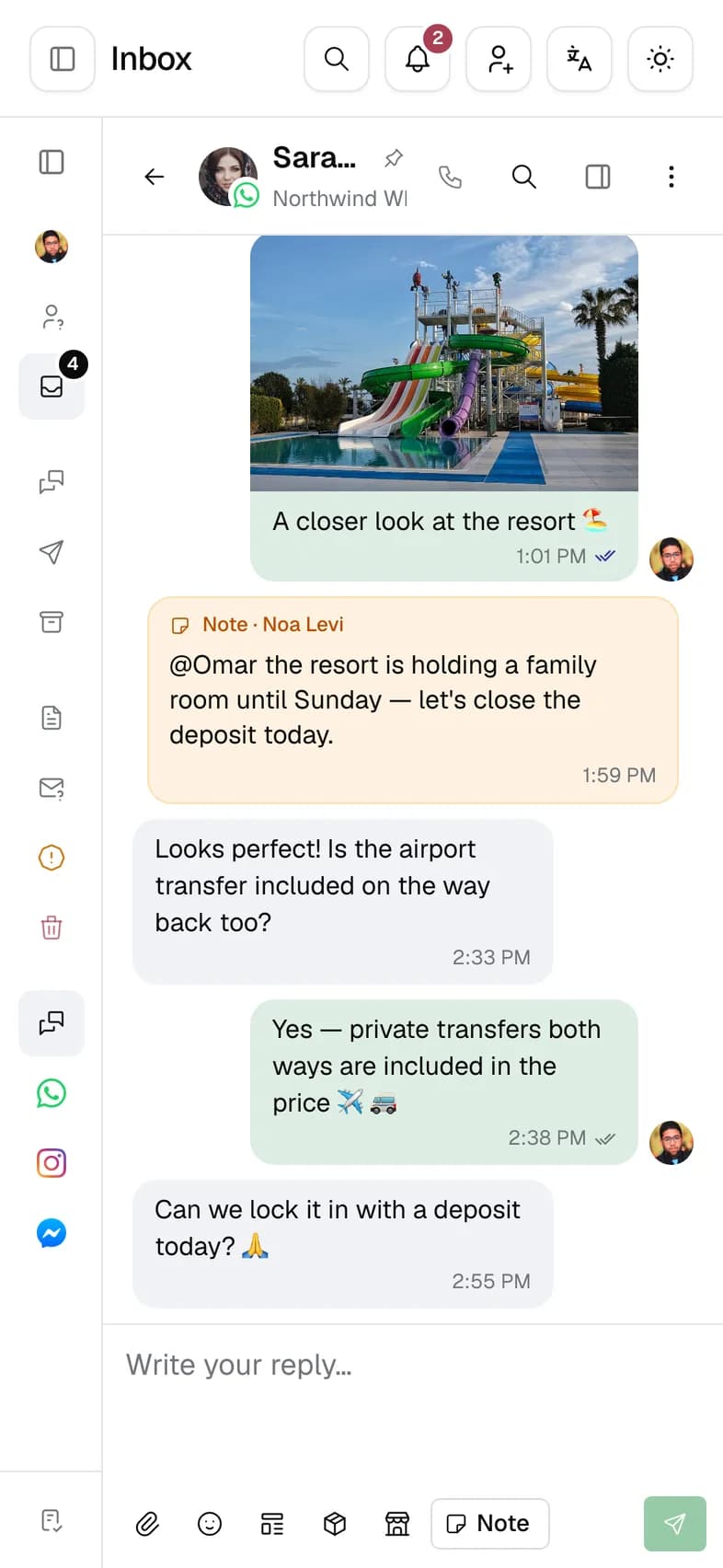
WhatsApp, Instagram and Messenger arrive in one list. See who owns each conversation, keep priority threads pinned, and discuss a case with your team without leaving the thread.
- AssignmentBy hand, or round-robin through an automation
- StatusesOpen and Closed, with spam kept apart
- Internal notesVisible to your team only
- Pinned and unreadPriority threads stay at the top
- FiltersAssignee, tag, channel and lead status
02 · WhatsApp Business
Built on the official WhatsApp Business Platform.
Engage connects through Meta's official platform, so your team works from your own business number, with approved templates, media and files, and a complete history for every customer.
- Status
- Connected
- Quality rating
- High
- Messaging limit
- 1,000 unique customers / day
- Platform
- Coexistence
- Connected
- Oct 1, 2026
Templates
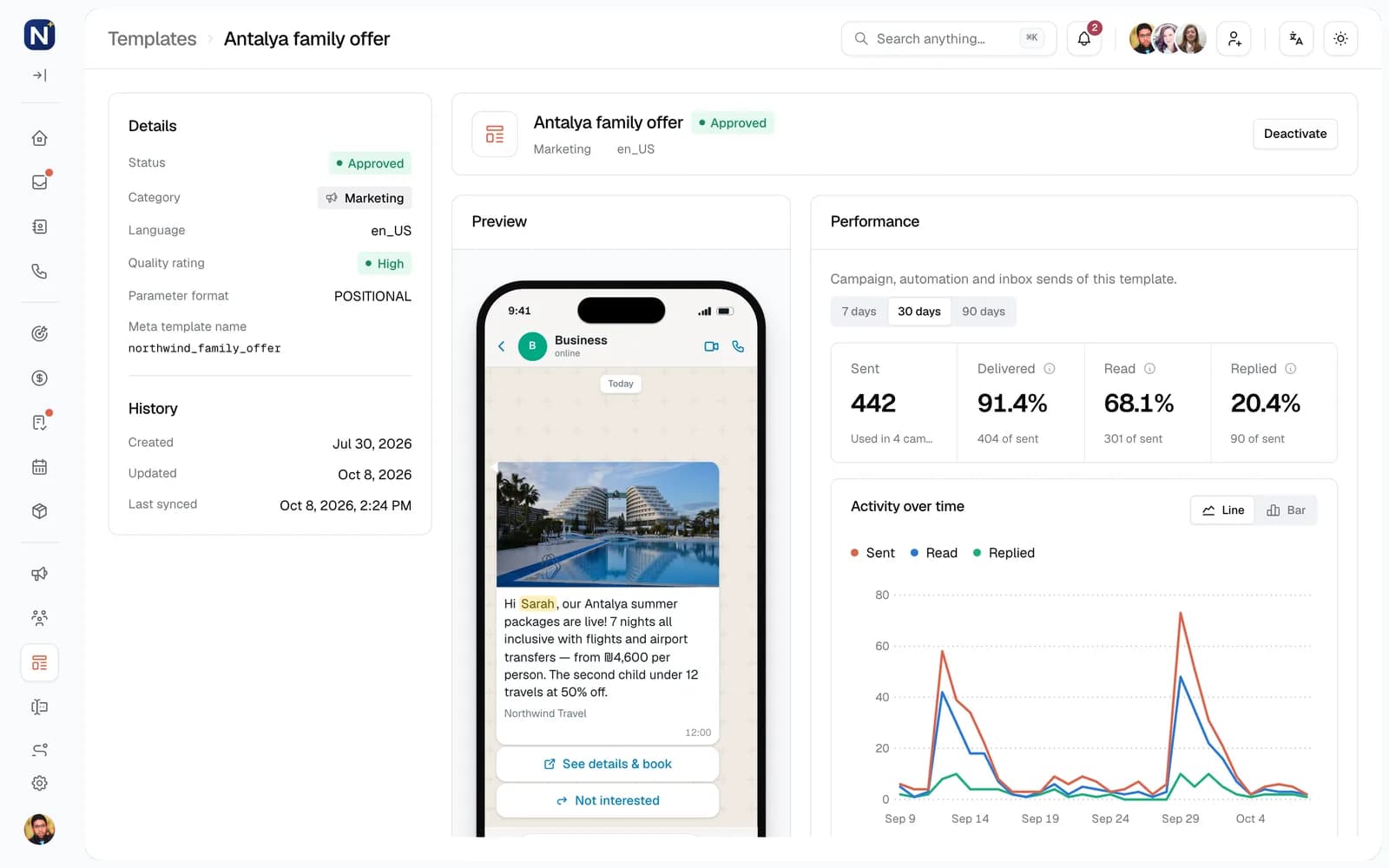
- booking_holdUtility · EnglishApproved
- spring_offerMarketing · EnglishApproved
- payment_reminderUtility · EnglishPending
Demo data
Templates
Approval status synced with Meta
Media and files
Images, video, documents and voice messages
Contact history
Every message in one timeline
Service window
Time left to reply freely, in each thread
Opt-outs
Respected in every campaign
Keep the WhatsApp Business app
Coexistence keeps the same number working in the app
03 · Bulk campaigns
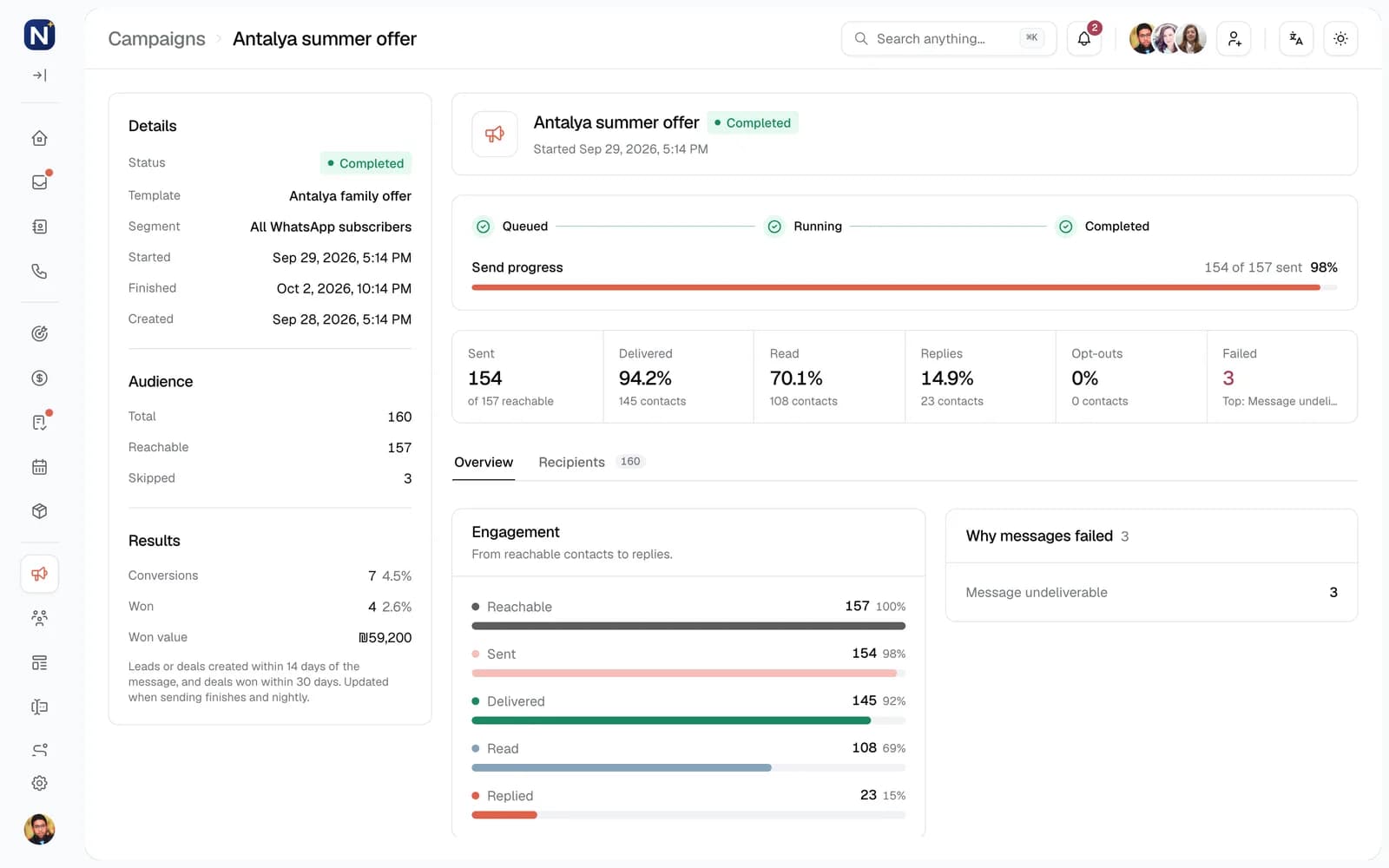
Campaigns that reach the right people.
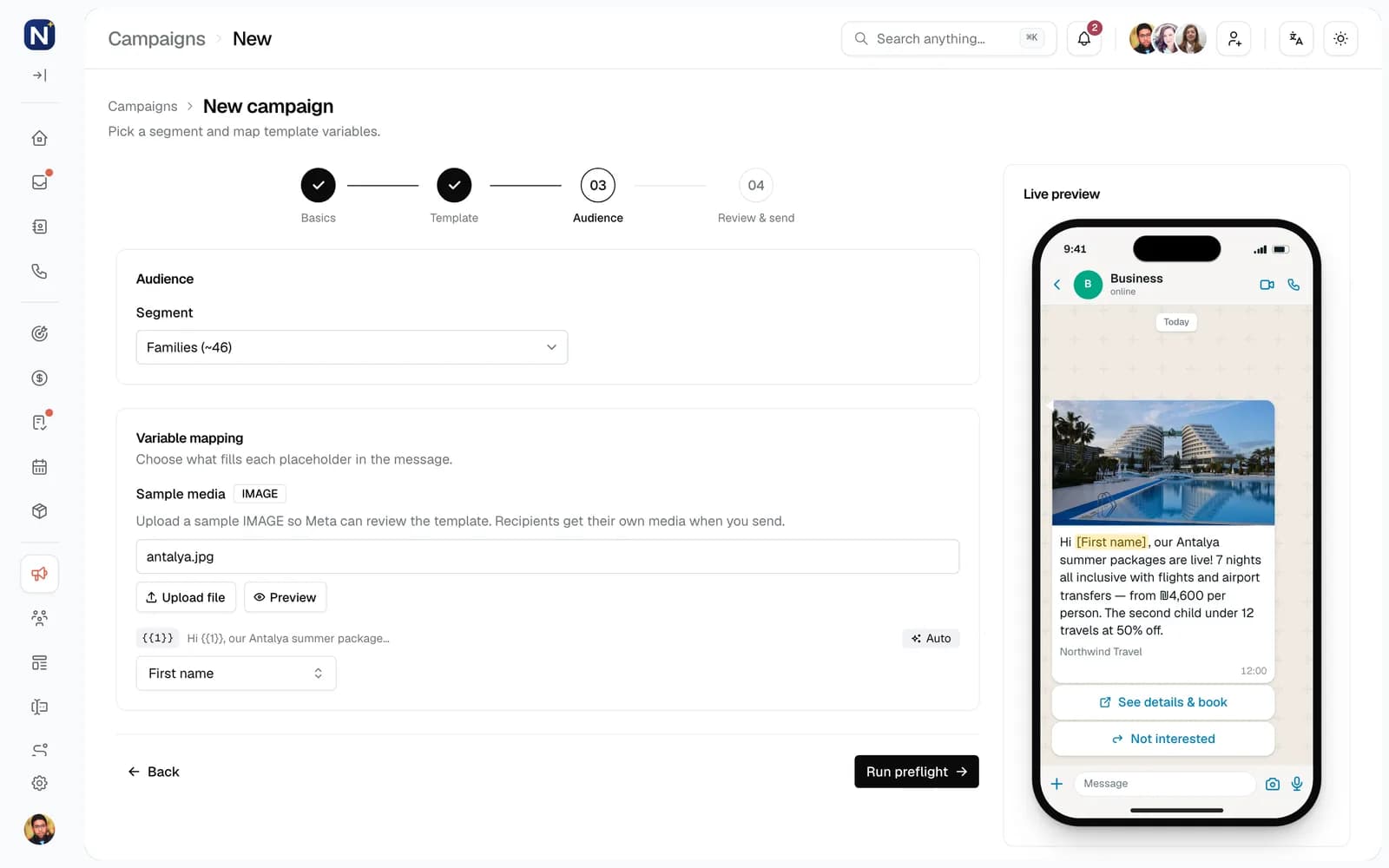
Pick an approved template, choose a segment from your CRM data, review who gets it, then follow every send through delivered, read and replied. Replies land in the inbox and can start an automation.
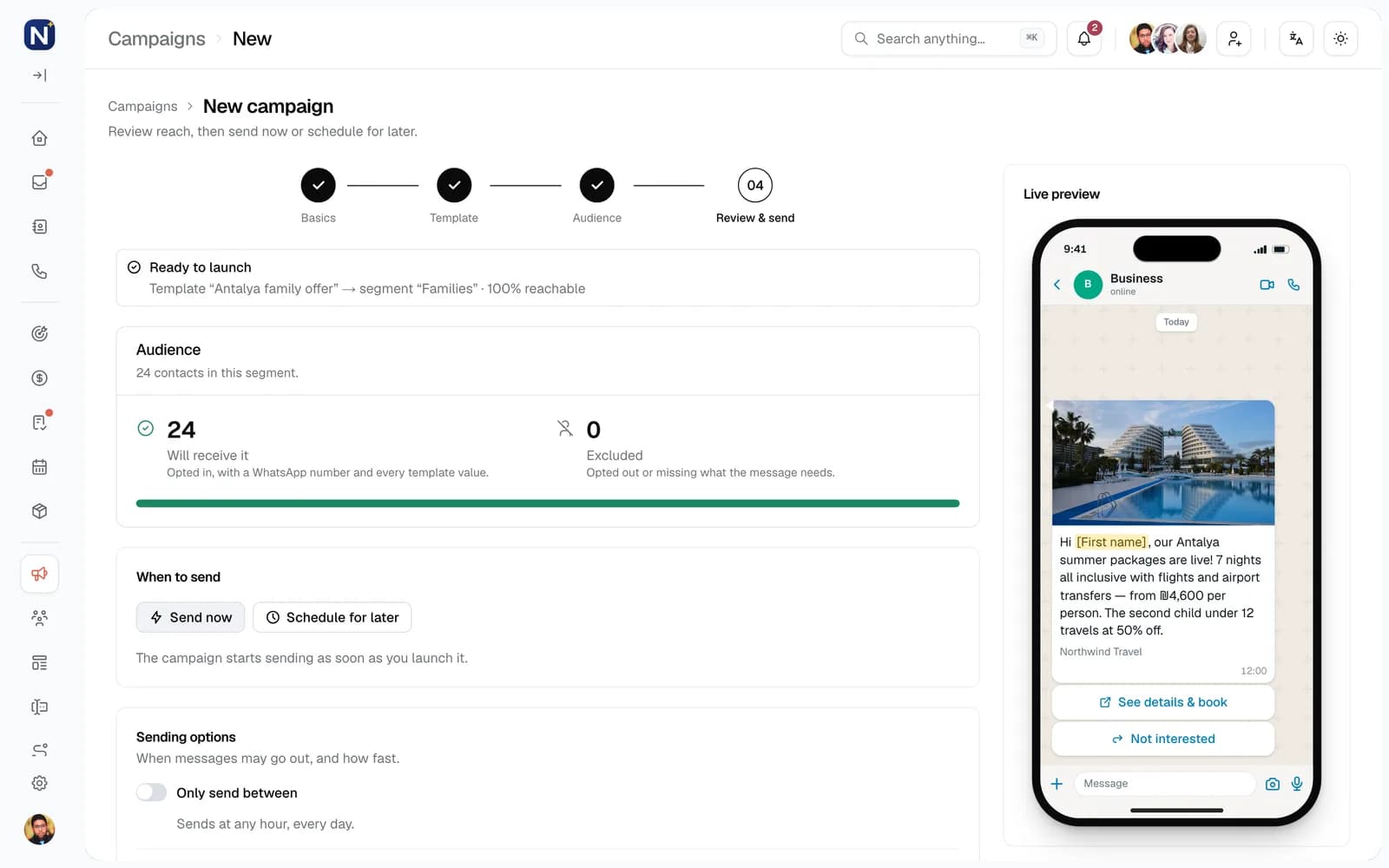
- A send window and a daily cap
- A small test group goes first
- Opted-out contacts are skipped
04 · Automation
Follow-ups that happen on their own.
A visual builder of triggers, conditions and actions. Send the first message within seconds, wait for a reply, and hand warm leads to a teammate without anyone watching the clock.
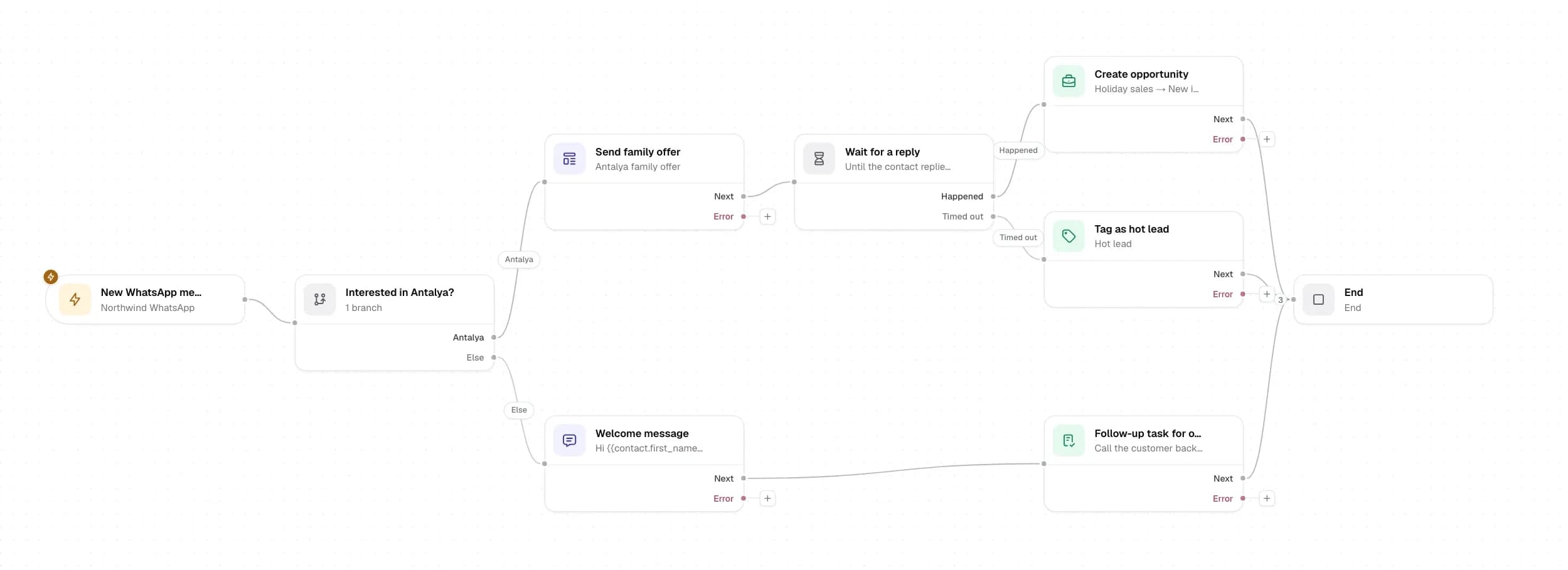
What starts the flow
Trigger
A new lead, an incoming message, a tag being added or a form submitted on your website.
Which path it takes
Condition
Branch on replies, tags, field values and variables, or wait for a reply with a time limit.
What Engage does
Action
Send a template, assign a teammate, update a deal, create a task, or call your own systems with an HTTP request.
05 · CRM
A CRM that lives next to the conversation.
Contacts, leads and deals are updated where the work happens, so sales and support see the same customer, with every message, note and task in one record.
Contacts and leads
One record per person, across channels
Pipelines
Deal stages you define
Tags and custom fields
Your own data model
Tasks
Assignees, due dates, priority and reminders
Notes and history
The full customer story
CSV import
Map your columns, preview, then import
The team that builds it is the team that runs it.
Engage is developed, hosted and operated by Comark, the same engineers who have built and run business systems and infrastructure since 2009. When you need something Engage doesn't do yet, we can build it.
Hosted and operated by Comark
Servers, monitoring, backups and updates are handled by our own engineers: one point of contact, no hand-offs between vendors.
- Monitoring
- Backups
- Updates
Security standards
Comark's processes follow recognised information-security standards. Traffic is encrypted and channel tokens are stored encrypted.
- ISO/IEC 27001Information security management
- ISO/IEC 27018Protection of personal data in the cloud
- ISO/IEC 27019Information security controls for the energy utility sector
Your website and your own systems
Capture leads from your website forms with Form intake, and call your own systems from any automation step with an HTTP request.
- Website forms
- HTTP request
- Meta channels
Custom development available
A report, an integration or a workflow specific to your business: Comark's development team can build it into your workspace.
FAQ
Questions teams ask before switching.
Is Engage an official WhatsApp integration?
Yes. Engage connects through Meta's official WhatsApp Business Platform, not a browser extension or an unofficial app. Your number is connected through Meta, messages outside the 24-hour service window use approved templates, and conversations are available to your whole team.
Can we keep our WhatsApp Business number and still use it on the phone?
Yes, with Coexistence. Connect the number you already use in the WhatsApp Business app: the app keeps working on your phone, replies sent from the phone appear in Engage, and your team can answer from the inbox at the same time. It needs WhatsApp Business app 2.24.17 or newer, and once connected the app turns off broadcast lists and disappearing messages.
Can we connect a personal WhatsApp number?
Not directly. Engage connects WhatsApp Business numbers. A number on regular WhatsApp first moves to the WhatsApp Business app, keeping the same number, and then joins Engage through Coexistence. Or start with a new number used only through Engage.
Do our contacts and past chats come with us?
With Coexistence, Engage brings in the contacts saved in your WhatsApp Business app and the last 6 months of chats, on the same contact records your team works from. Meta allows this import once, right after the number is connected. You can also import contacts from a CSV file.
Can we connect more than one WhatsApp number?
Yes. A workspace can hold several WhatsApp numbers, for example one for sales and one per branch, alongside Instagram and Messenger. Every conversation arrives in the same inbox, and you can filter it by number. How many channels your workspace includes is agreed with you during onboarding.
Coexistence or a new number: which should we use?
Coexistence suits a number that already runs on the WhatsApp Business app and that you want to keep answering from the phone. A new number (Cloud API) runs only in Engage and suits teams that work entirely from the inbox, campaigns and automations. Numbers in Coexistence send campaigns at a gentler pace, and WhatsApp calling in Engage needs a Cloud API number.
How many team members can use one number?
Your whole team works from the same connected number, each with their own login. Admins decide what each member can see and do.
Do you support Instagram and Messenger?
Yes. Instagram and Facebook Messenger conversations arrive in the same inbox as WhatsApp, on the same contact records. Engage doesn't connect other channels such as SMS, email or website chat.
Can Engage connect to our website and other systems?
Website forms can send submissions straight into Engage as leads (Form intake), and any automation can call your own systems with an HTTP request step. Engage has no public API; anything beyond that is custom work Comark's development team can take on.
Where is our data hosted, and who operates it?
Engage is hosted and operated by Comark. Each workspace's data is isolated at the database level, channel tokens are stored encrypted, and incoming Meta webhooks are signature-verified.
Does Engage work on a phone?
Yes. Engage is a web app that works in your phone's browser, so your team can answer from anywhere. There is no separate app to install.
Can Comark build custom features for our team?
Yes. A report, an integration or a workflow specific to your business can be built into your workspace by Comark's development team.
Book a demo
See Engage with your own workflows.
We'll walk through your channels, team and follow-up process, and show how they would run in Engage.
In the demo
- Your channels and teamNumbers, teammates and who answers what.
- A live walkthroughInbox, campaigns, automation and CRM.
- SetupOnboarding, connecting your channels and importing your contacts.